Showing posts with label Domain Controller. Show all posts

31 March 2019

SYSVOL and NETLOGON Share is missing in Newly Built Domain Controllers

I recently provisioned a new Domain Controller, running Server 2016.  

After joining to domain, adding the AD roles and then promoting to DC, I noticed the NETLOGON and SYSVOL folders were missing.  Not just the shares, but the actual folders themselves.

Luckily, I was able to fix this rather easily, by following these steps:

  1. Click Start, click Run, type regedit, and then click OK.
  2. Locate the following subkey in Registry Editor:HKEY_LOCAL_MACHINE\SYSTEM\CurrentControlSet\Services\Netlogon\Parameters
  3. In the details pane, right-click the SysvolReady flag, and then click Modify.
  4. In the Value data box, type 0, and then click OK.
  5. Again in the details pane, right-click the SysvolReady flag, and then click Modify.
  6. In the Value data box, type 1, and then click OK.
Once this is done, you simply have to stop and start the netlogon service.

  • Net Stop Netlogon
  • Net Start Netlogon

30 June 2018

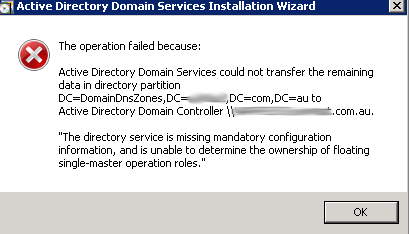
DCPromo fails with: "The directory service is missing mandatory configuration information, and is unable to determine the ownership of floating single-master operation roles"


I was recently decommissioning an old DC as part of an infrastructure upgrade project for a client of ours. When attempting the DCPROMO process to remove the old DC, I encountered the following error:


This is very easy to resolve, however it usually is a result of an old DC that's no longer in the network that's not been decommissioned properly.

There are two types of error messages that look almost the same, however they will both hold you up when trying to decommission the server:


  • ForestDnsZones
  • DomainDnsZones
The same process can be followed to resolve each of these messages, and I would suggest that if you encounter the error above, then you sort these both out.

To investigate the issue, you can run the following command, which will tell you the dSMORoleOwner:

dsquery * CN=Infrastructure,DC=ForestDnsZones,DC=domain,DC=local -attr fSMORoleOwner

I received the following results, which shows the orphaned object.  You can see this by the "0ADEL:XXXXX" part in the return query.


In order to resolve this, you need to set the new server as the role owner.  This can be done in ADSI Edit.

Open up ADSI Edit and navigate to the following path:

CN=Infrastructure,DC=ForestDnsZones,DC=domain,DC=com


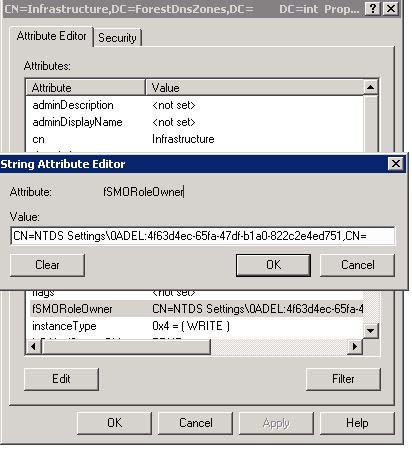
Right-click > Properties on 'infrastructure', and under Attribute Editor, search for fSMORoleOwner.


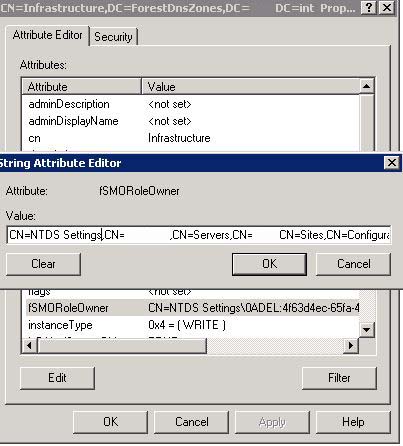
Now replace this with the location of your PDC which should have all the FSMO roles assigned to it:

CN=NTDS Settings,CN=ServerName,CN=Servers,CN=Perth,CN=Sites,CN=Configuration,DC=Domain,DC=com


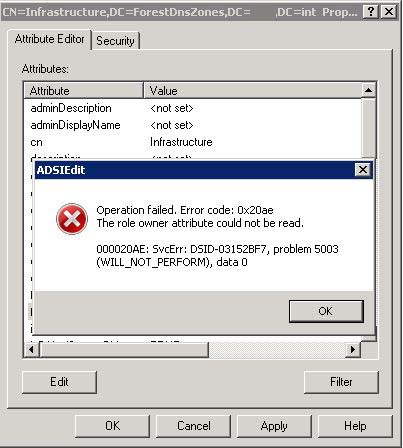
That's it!  You're done.  If you do notice you get the following error, it will be because you're probably making this change on the troublesome DC.  Make sure you do this on one of the other working DCs and you will avoid any errors.

28 December 2016

Directory service is missing mandatory configuration information | Server 2008R2

I was recently demoting a Domain Controller as I had upgraded to Server 2016, when I came across the following error message:


What this means is that the fSMORoleOwner is most likely pointing to the server that you're trying to decommission, and of course you can't do this.  So what needs to be done is to update this to point to another DC that's active.

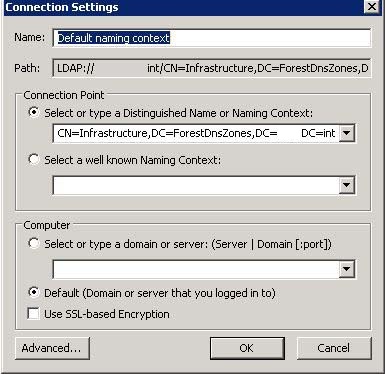
First, to confirm this, you will need to go into ADSI Edit. Connect to the following:


Once you've done this, open up DC=Infrastructure:


Look for fSMORoleOwner and check the server name that is referenced here:

In this case, it's showing my new DC, however originally it was showing the DC that I was wanting to decommission.  In order to resolve this, I used the following script:

const ADS_NAME_INITTYPE_GC = 3
const ADS_NAME_TYPE_1779 = 1
const ADS_NAME_TYPE_CANONICAL = 2

set inArgs = WScript.Arguments

if (inArgs.Count = 1) then
    ' Assume the command line argument is the NDNC (in DN form) to use.
    NdncDN = inArgs(0)
Else
    Wscript.StdOut.Write "usage: cscript fixfsmo.vbs NdncDN"
End if

if (NdncDN <> "") then

    ' Convert the DN form of the NDNC into DNS dotted form.
    Set objTranslator = CreateObject("NameTranslate")
    objTranslator.Init ADS_NAME_INITTYPE_GC, ""
    objTranslator.Set ADS_NAME_TYPE_1779, NdncDN
    strDomainDNS = objTranslator.Get(ADS_NAME_TYPE_CANONICAL)
    strDomainDNS = Left(strDomainDNS, len(strDomainDNS)-1)
     
    Wscript.Echo "DNS name: " & strDomainDNS

    ' Find a domain controller that hosts this NDNC and that is online.
    set objRootDSE = GetObject("LDAP://" & strDomainDNS & "/RootDSE")
    strDnsHostName = objRootDSE.Get("dnsHostName")
    strDsServiceName = objRootDSE.Get("dsServiceName")
    Wscript.Echo "Using DC " & strDnsHostName

    ' Get the current infrastructure fsmo.
    strInfraDN = "CN=Infrastructure," & NdncDN
    set objInfra = GetObject("LDAP://" & strInfraDN)
    Wscript.Echo "infra fsmo is " & objInfra.fsmoroleowner

    ' If the current fsmo holder is deleted, set the fsmo holder to this domain controller.

    if (InStr(objInfra.fsmoroleowner, "\0ADEL:") > 0) then

        ' Set the fsmo holder to this domain controller.
        objInfra.Put "fSMORoleOwner",  strDsServiceName
        objInfra.SetInfo

        ' Read the fsmo holder back.
        set objInfra = GetObject("LDAP://" & strInfraDN)
        Wscript.Echo "infra fsmo changed to:" & objInfra.fsmoroleowner

    End if

End if

Create a new VBS file with the above script, and called it "FixFSMO.vbs".  Copy this to the desktop of a DC that's active and then run the following command:

cscript fixfsmo.vbs DC=DomainDnsZones,DC=contoso,DC=com


You will also need to run the same command, but for ForestDNSZone.  

cscript fixfsmo.vbs DC=ForestDNSZones,DC=contoso,DC=com

Once you've done this, check the ADSI object again and you will notice this has now updated to an active DC.  Let this sit for 15 minutes or so to ensure that it syncs to all DCs, and then you should be able to re-run the DCPROMO to demote the Domain Controller.